Can an agent one-shot a printed circuit board: place it, route it, and hand you something you could order? We now have real numbers instead of opinions. We built a harness that runs every automatic router we have on the same board, scores every result the same way, and keeps the scores. The first run was on einhander, the 4-layer RP2040 USB-MIDI keypad from the re-route post. Four routers, one placement, about two minutes. A port of tscircuit's own autorouter that we run directly on the KiCad board came out ahead. Freerouting, our default until now, left two nets open. And none of the four produced a board you could order: today, on a 42-part board, the answer is no, not quite. What gets it close is not a cleverer router.
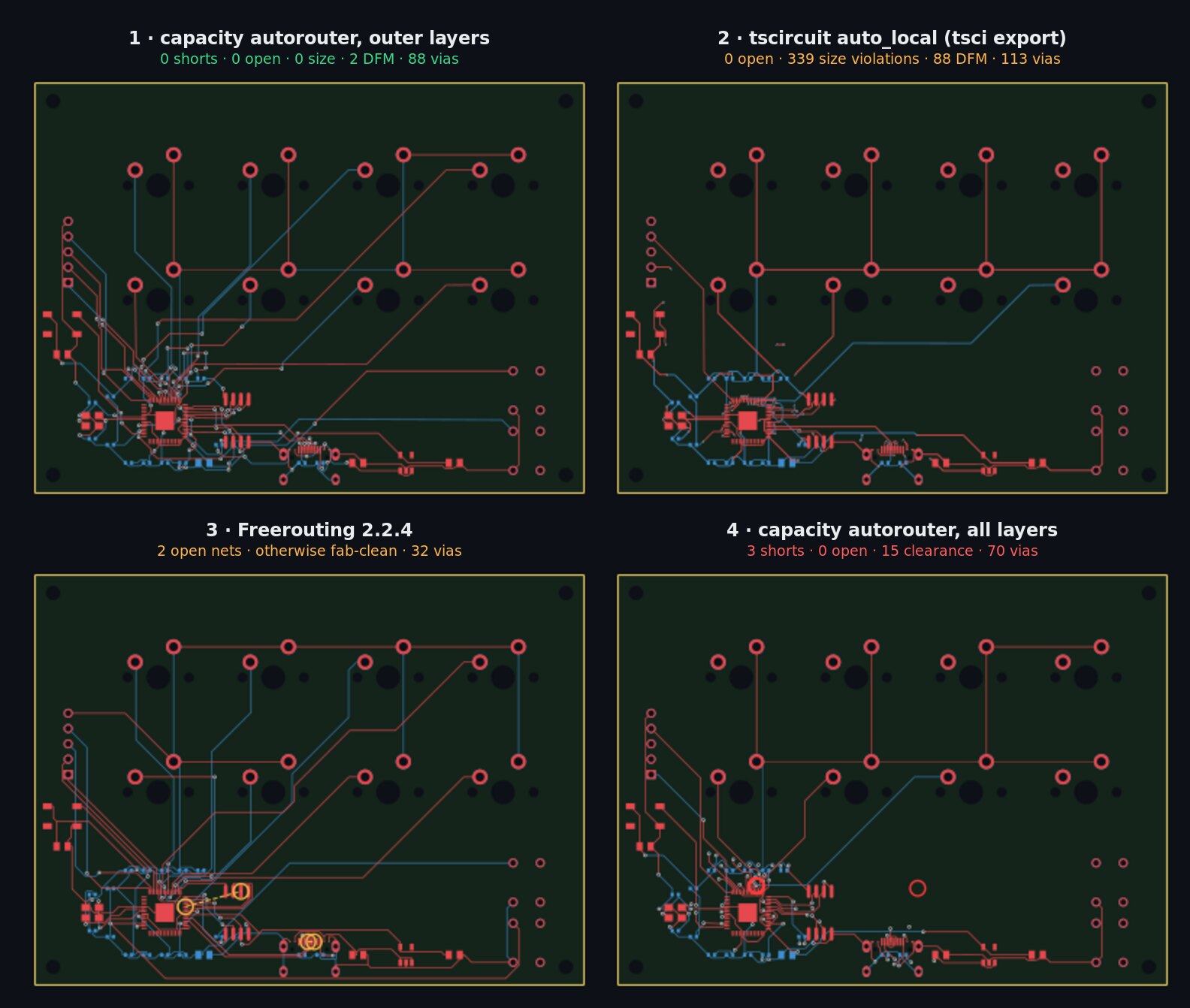
01 / The four routers
- Freerouting 2.2.4. The open-source maze router our pipeline has used all along. It works on a DSN export and hands back an SES file that gets injected into KiCad.
- tscircuit
auto_local, throughtsci export. tscircuit routes the design while it evaluates it, and the KiCad export carries the traces. We run it on a temporary copy of the design file with the router setting swapped in, so the design itself is never edited. - tscircuit-autorouter, run directly on the KiCad board, on the outer two layers or on all four. This is the same MIT-licensed router inside tscircuit, used as a library. We convert the
.kicad_pcbinto its input: every pad at its real copper extent with its net, the drilled holes, the board bounds, and the fab's via sizes and clearances. Then we write its routes back as KiCad tracks and vias. It runs locally; the package also offers a networked solver that sends work to a remote cache, which we do not use.
FastRoute is also supported by the harness but was not installed on this machine, so it is not in this run.
02 / How every candidate is scored
Each router runs the full pipeline in its own copy of the project, so planes, fab rules and checks are applied identically and the project is never touched. Every candidate then gets the same checks: KiCad DRC under JLCPCB's rules, our fab check for hole spacing and via sizes, a check for pads reached only from the wrong side of the board, and the critical-routing gate when a board has a routing policy. They are ranked in this order:
- shorts and crossings
- open nets
- fab-rule failures (hole spacing, drill sizes)
- floating pads
- size violations (track width, via size, drill, annular ring)
- clearance violations
- fewer vias, then less copper
That order is a judgement: an open net or a short is a dead board however tidy the rest is. So read the whole table, not just the winner.
03 / The results
| # | Router | Shorts | Open | Fab (DFM) | Size | Clearance | Vias | Track | Time |
|---|---|---|---|---|---|---|---|---|---|
| 1 | tscircuit-autorouter, outer layers | 0 | 0 | 2 | 0 | 32 | 88 | 1391 mm | 35 s |
| 2 | tscircuit auto_local (tsci export) | 0 | 0 | 88 | 339 | 276 | 113 | 1347 mm | 24 s |
| 3 | Freerouting 2.2.4 | 0 | 2 | 0 | 0 | 0 | 32 | 1421 mm | 31 s |
| 4 | tscircuit-autorouter, all layers | 3 | 0 | 1 | 0 | 15 | 70 | 1355 mm | 29 s |
Versions: tscircuit 0.0.2744, @tscircuit/capacity-autorouter 0.0.958, Freerouting 2.2.4, KiCad 9.0.8. Same placement for all four.
04 / What each router got right and wrong
Freerouting is the most careful about the fab: no size or clearance problems at all, and the fewest vias. But it leaves two nets open, and it does so quietly: it reports success while one of them, the QSPI clock to the flash, is missing from its output altogether. The other stops one pad short at the USB connector.
tscircuit through tsci export connects every net, which is new: in June, tscircuit's routers stalled or gave up on our boards, one reporting it had run out of iterations with no traces at all. But its 113 vias are 0.2 mm drills, below JLCPCB's 0.3 mm, because the export path does not pass the board's via settings to the router. It also stacks some duplicate vias and runs signals through the layers meant for the ground and power planes. Hence the 339 size violations and 88 fab hits.
The same router, run directly on the KiCad board, fixes most of that, because there we set the via sizes and clearances ourselves. On the outer layers, leaving the inner layers to the planes, it connects every net with no shorts and no size violations. What is left is 2 fab hits and 32 clearance violations. Given all four layers it uses fewer vias but makes 3 shorts. Two things mattered more than any setting:
- Real pad shapes. einhander's USB-C connector has custom pads whose nominal size is a 0.2 mm square; the copper is a 0.6 × 1.3 mm shape described separately. The first prototype read the nominal size, and the router ran tracks straight through the real copper. All three shorts in that run were at the connector.
- Refill the planes after routing. Plane copper filled before routing has no clearance holes for the new vias, so the vias through a plane read as shorts and clearance violations against copper that should not be there. KiCad's command-line DRC cannot refill zones, so the router script does it.
The remaining issues come from the router itself, and the checks catch them. In a few places it narrows a trace to 0.1 mm, below the fab's minimum, and it occasionally places a via against another net's track. The harness keeps the router's exact input and output for every run, so they can go upstream as bug reports.
05 / What we use it for
The winner is the best starting point, not a finished board. Nothing in this run is orderable as it stands. The top candidate needs its 2 fab hits and 32 clearance violations fixed by hand or by a finishing pass, while Freerouting's needs two nets routed. Which is less work depends on the board, and that is exactly what the table is for. The harness can also install the winner over the board, keeping the previous one.
What makes one-shotting realistic is placement. Every board in our history says the same thing: routing difficulty is decided before any router runs. Splitting the design into subcircuits that route on their own, giving dense parts room, and placing decoupling and connectors by rule are what turn a router's 2 open nets into 0. So we keep iterating on subcircuit and part placement to raise the odds of a clean route, and the harness tells us whether each change helped. Next we want a score for the placement itself, before routing: one that says whether a board's remaining problems are worth finishing by hand, or a sign that a region needs placing again.
Keeping the scores is the point. Every run appends one line per candidate to a history file, with the router versions and our own revision. When a router upgrades, as tscircuit's evidently keeps doing, rerun and compare instead of remembering. One board is not a benchmark, so the next step is running the same harness across the rest of our boards.
Upgrade notes, for anyone following along. The latest tscircuit disables the sequential_trace router our skill used to recommend; its default router replaces it. And installing the latest tscircuit and its CLI currently needs an npm overrides entry, because the CLI pins an older circuit-json than the core needs.
The harness (route_eval.py), the KiCad-board router (route_srj.mjs) and the tscircuit router (route_tscircuit.mjs) are in the pcb-layout skill at punkfab/circuit-skills. They plug into the ChatGPT and Claude viewers, which show each router's progress live. Have a board you want routed, by whichever router does it best? Start a project →